Showing posts with label Hardware & Networking. Show all posts

Saturday, 3 October 2015

Networking cables (LAN cable)

Networking cables are used to connect one network device to other network devices or to connect two or more computers to share printer, scanner etc. Different types of network cables like Coaxial cable, Optical fiber cable, Twisted Pair cable, Twisted Pair cables are used depending on the network's topology, protocol and size. The devices can be separated by a few meters (e.g. via Ethernet) or nearly unlimited distances (e.g. via the interconnections of the Internet).

Now a days we are all know LAN cables but we don't know that cable which category, how much speed and bandwidth support.ok don't worry about that for your reference i given all the details below.

Category
Speed
Bandwidth
Application
Cat 1

100 K Hz
Voice only (Telephone) No longer used
Cat 2
4 Mbps
1 MHz
Data (Local talk) No longer used
Cat 3
10 Mbps
16 MHz
Data (Ethernet) No longer used
Cat 4
20 Mbps
20 MHz
Data (Token ring) No longer used
Cat 5
100 Mbps
100 MHz
Data (Fast Ethernet)
Cat 5 E
G bps
100 MHz
Data (Gigabit Ethernet)
Cat 6
1 G bps
250 MHz
Broadband data (Gigabit Ethernet)
Cat 6 A
10 G bps
500 MHz
Broadband data (Gigabit Ethernet)
Cat 7
10 G bps
600  MHz
Broadband data (Gigabit Ethernet)
Cat 7 A
10 G bps
1000 MHz
Broadband data (Gigabit Ethernet)
Cat 8
40 G bps
2 GHz
Broadband data (Gigabit Ethernet)

Tuesday, 29 September 2015

How much speed support your NIC card (LAN Card) in your system?

Do you want to know your system NIC card (LAN Card) supporting speed just follow my steps 
  • Go to the Control Panel".
  • Select "Network and Sharing Center".
  • On the Left panel select "Change Adapter settings"
  • Right click on the "Local area Connection" and select "Properties".
  • In the "Local Area Connection Properties" window select the "Configure" button.
  • Select the "Advanced" tab.
  • In the scroll list of options find "Speed & Duplex" or "Link Speed & Duplex" and select it.
  • The NIC speed will be displayed in the "Value" drop down menu.
My system (NIC card) support up-to 1 G bps, What about your System ?

Tuesday, 26 May 2015

How to Recover/Break the Password in Cisco Switch/Router

You forget your user login password in Cisco Switch/Router don't worry friend today  we learn How to Recover/Break the Password in Cisco switch/router.

Step-by-Step Procedure
  • Connect a rollover cable to the router console port (RJ-45 connector).
  • Connect the other end of the rollover cable to the RJ-45 to DB-9 converter
  • Attach the female DB-9 converter to a PC Serial Port.
  • Open emulation software on the PC.
  • Then what ever tool to use configure switches/routers open that( like putty, hyper terminal).
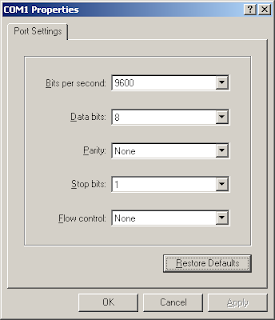
  • Select Serial (Com) Port where Router is Connected.
  • In Com Port Settings Click on Restore Defaults.
  • Either switch off or shut down the router.
  • Switch on the router and Once the press Ctrl+Break within 60 seconds to go into Router  ROMMON mode.
  •  Type confreg 0x2142 at the rommon 1>
  •  Type reset at the rommon 2> 
  • Now reboot the router , but ignores the saved configuration.
  • Type no after each setup question, or press Ctrl-C in order to skip the initial setup procedure.
  • Now you go and login your cisco router with out  asking any password to move from user mode to privileged mode.

Thursday, 23 April 2015

What Are The Basic Components Need to Assemble One System ?

 
In this post you will learn What Are The Basic Components Need to Assemble One Computer System
I will show you here each and every components.